

USER GUIDE & SETUP MANUAL
Simple Setup. Powerful Protection.
Welcome to UBITracer User Guides.
No professional hardware installation required. Below are hardware activation instruction and software user guide.
Zero Hassle
Ready Out of the Box
We've handled the technical stuff so you don't have to. Every UBITracer Multi-Sensor GPS comes pre-configured with a global SIM card. No contracts to sign, no complex installation needed.
Pre-installed SIM
Connects instantly to the best local network.
No Installation Required
Includes charging cable and pre-charged battery.
Charging guide
ZT-28S Charging LED Indicator Guide
Understanding your device's charging status ensures optimal performance and readiness. Watch the accompanying video guide to quickly learn how to read the LED indicators on your UBITracer ZT-28S. By monitoring the red and blue lights, you can easily identify exactly what stage of the charging process your device is in.
Power On & Standby
🔴 Solid Red
🔵 Flashing Blue
Charging in Progress
🔴 Solid Red
🔵 Solid Blue
Fully Charged
🔴 Solid Red
⚪ Blue Light Off
STEP 01
Download the App
Search "UBITracer" in Apple App Store or Google Play Store to download the mobile app. Or scan the QR code on the right to install.




STEP 02
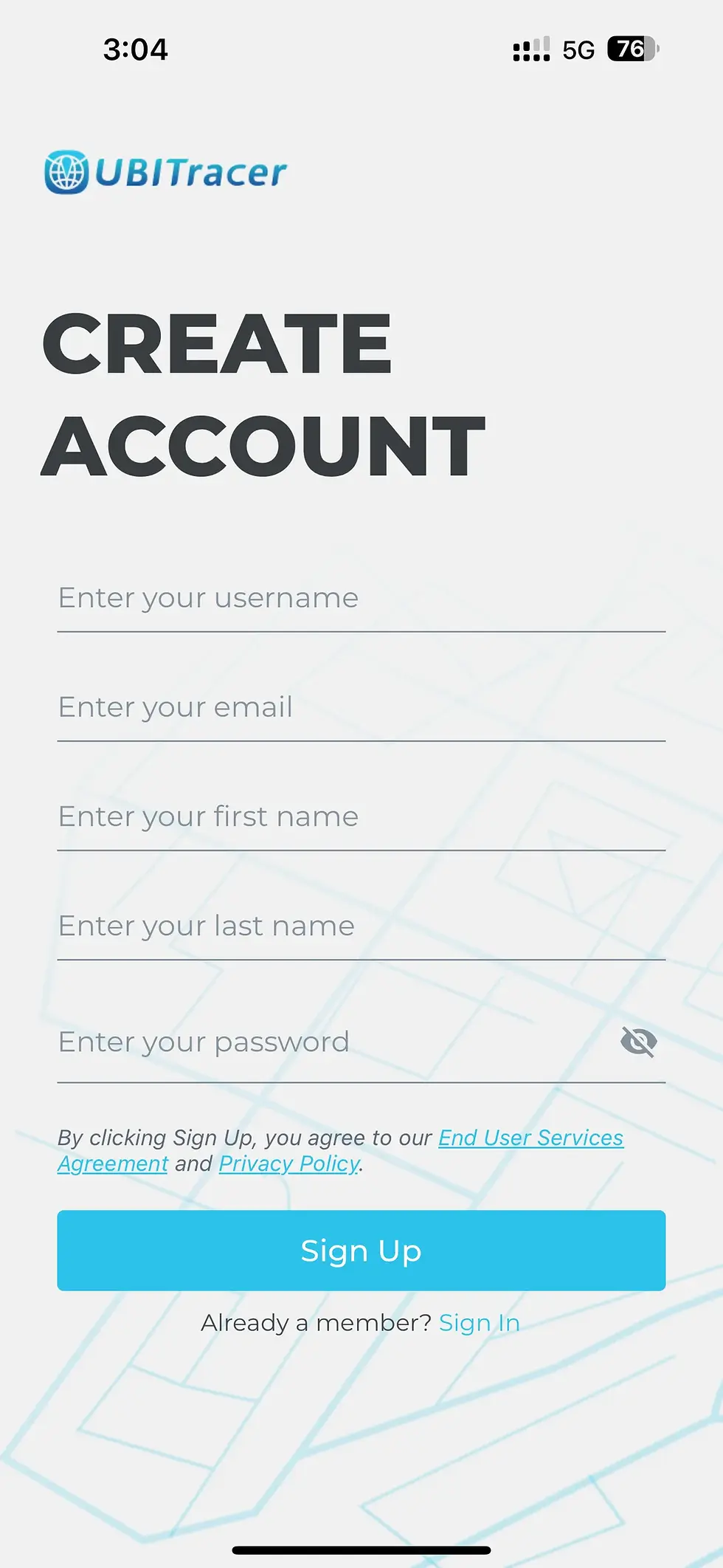
Create Account
Open the app and tap "Sign Up". Enter your email and create a password to set up your secure UBITracer account.
Check Your Email
A 6-digit verification code will be sent to your email. If you do not see it immediately, please check your Spam/Junk folder or email banners.
STEP 03
Register Device
Log into the app. Click "Scan QR Code" or the "+" icon under "Devices" tab.
2 Registration Methods:
1
Scan QR:
Scan the code on the front of the device.
2
Manual Input:
Type in the SN under the bar code.
.jpg)

STEP 04
Subscribe to a Plan
Choose a data plan to activate the global cellular connection. Pick one with Trial if you are a new customer. Plans start from just $7.99/mo.
STEP 05
Activate Device
Activate the device where good cell signal is available. Pull out the orange tag located on the back side of the device.
The signal light in the front will flash until completing initial communication. Start your tracking experience on the UBITracer Mobile App.
Troubleshooting Activation Failure
If your ZT device keeps flashing, initial communication has failed.
Poor local cell signal may cause activation difficulties. To resolve this, take your device to a location with better coverage, such as a shopping mall or school.
Locate the two pogopins on top of the ZT device and use a metallic object (like a paperclip or key) to press against both pins simultaneously for 5 seconds. The light indicator will flash once the object is removed.
If activation fails, repeat this every 30 minutes; once activated, the device will remain functional even if you return to an area with weaker signal.
Control Everything From Your Pocket.
Select an Operation Mode based on your needs, and feel free to switch modes at any time.
Movement Tracker
REAL-TIME TRACKING
Switch to Movement Tracker Mode to incorporate three different methods—GPS, Wi-Fi, and Cellular Signal—and precisely track your car's location both indoors and outdoors with exceptional accuracy.
Temperature Monitor
Heatstroke Prevention
Switch to Temperature Monitor Mode to monitor your car's cabin temperature, helping protect your children and pets from heatstroke, hyperthermia, or hypothermia—even when your vehicle is parked.
Vehicle/Person Finder
Theft/Loss Recovery
Switch to Vehicle/Person Finder Mode for high-accuracy indoor/outdoor tracking. The device alerts you when movement stops or resumes, ensuring you know exactly where to find it in case of theft or loss.
EXPERT MODE
FULL CONTROL
Switch to Expert Mode to unlock the full power of UBITracer and fine-tune settings for movement tracker, temperature monitor, stolen car finder, and much more.
Privacy by Design
Designed for Privacy. Not for Stalking.
We made a conscious choice: No magnets. No stalking. While generic trackers prioritize convenience for hidden surveillance, UBITracer prioritizes the safety of your cars and the privacy of our communities.
GENERIC TRACKERS
The Risks
Stalking Risk
Magnetic trackers can be attached under ANY car in seconds by strangers.
False Alarms (Rattling)
Loose magnetic attachment causes device to rattle against metal, triggering constant false vibration alerts.
Phone Dependent
Bluetooth tags rely on nearby phones to work, compromising privacy of passersby.
The Safeguards
UBITracer Multi-Sensor GPS
No Magnets = Asset Protection
We intentionally removed magnets to protect privacy. Unlike generic trackers that can be hidden under someone's car, UBITracer is built for legitimate asset protection, not illicit surveillance.
Precision Data
Secure placement inside the vehicle (glovebox/seat) ensures "rigid connection", filtering out noise for 100% accurate detection.
Independent Cellular
Uses its own encrypted cellular connection. No Wi-Fi needed. Does not track or piggyback on other people's devices.
Legal Disclaimer
Strictly for tracking personal assets. Illegal tracking of others is prohibited and actionable by law.